Archive

Archive for the ‘Tools’ Category

Simple Precision-Screwdriver Holder

December 14th, 2009 2 comments
Workshop wall

Workshop wall

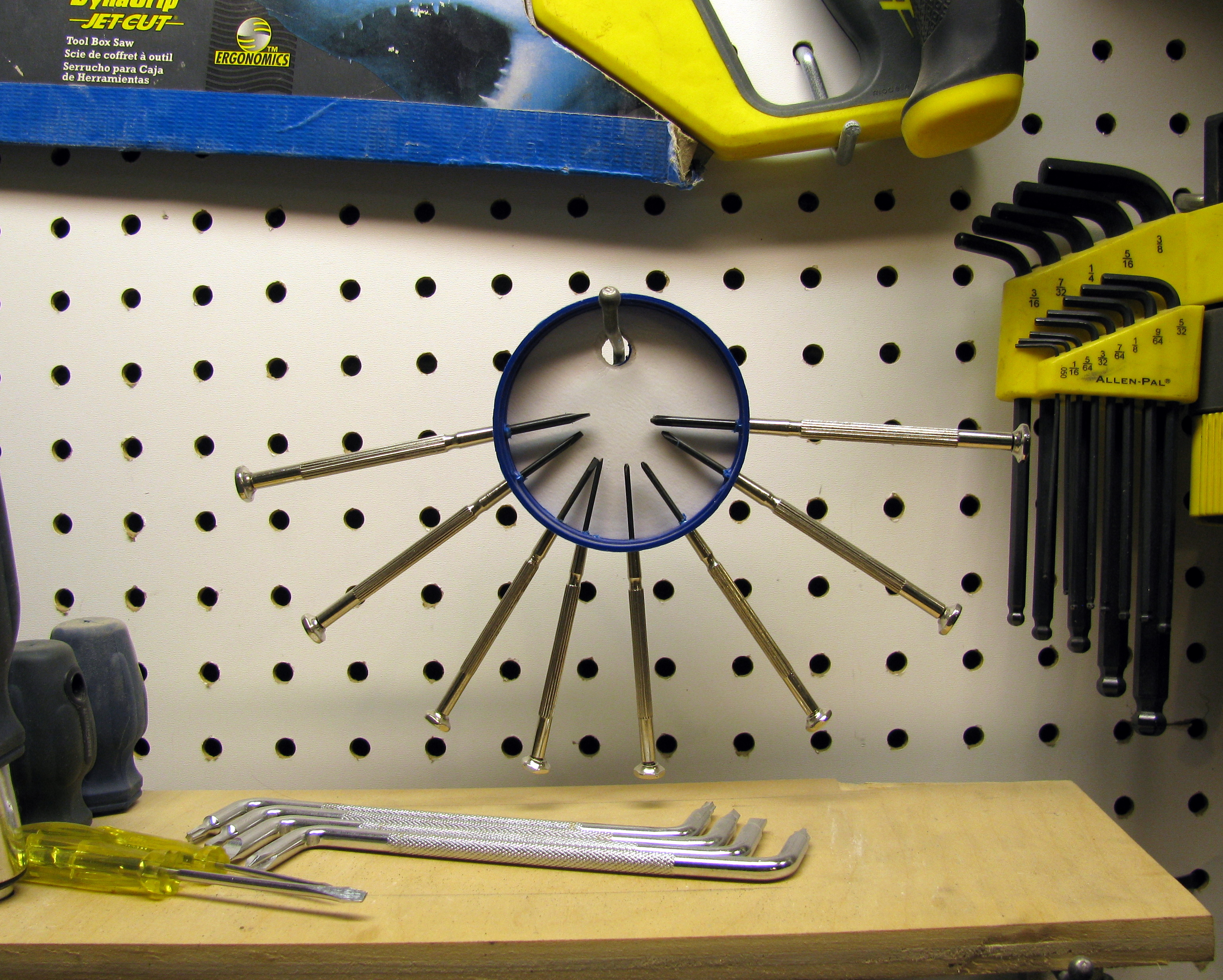
This is a very simple and quick hack that anybody can do. The objective is to build a holder that will keep all the precision screwdrivers in one place and facilitate the access to them (i.e. it should be easy to see which one is which and they should be easy to take).

Materials

  • A plastic container cap (I love caps)
  • That’s it, you do not need anything else

Tools

  • Drill or strong scissors
  • Precision screwdrivers
  • A nail (maybe)

Doing it

Screwdriver Holder

Screwdriver Holder

  1. Drill or cut a big hole on the top of the cap. This hole will be used to suspend the screwdriver holder.
  2. Punch in the Screwdrivers in the rim of the cap. If you do not trust your screwdrivers to pierce your cap, you may use a nail. Keep in mind that the screwdrivers have to be very snug in the holes since they are only being held-in by friction.
  3. Celebrate! you are done.
Share and Enjoy:
  • Digg
  • StumbleUpon
  • Reddit
  • Twitter
  • Facebook
  • del.icio.us
  • Google Bookmarks
  • Print
Categories: My Projects, Tools Tags: ,

Enough with the guesswork, I got Logic

December 11th, 2009 No comments

I just got a shiny new Logic, a tiny 8-channel, 24 MHz logic analyzer from Saleae LLC, and it is beautiful. I’ve been wanting to get a logic analyzer for quite some time and this little guy is definitely worth the 150 bucks it costs.

Logic Unboxing

Logic Unboxing

Logic Analyzer?

(skip this if you already know what a logic analyzer is and do not want to be bored to death)

A logic analyzer is a measurement instrument that allows you to record the logic level (e.g. high or low) of a digital signal throughout time. This means that if you are working with a micro-controller and want to know what is actually happening at the pins, you can use a logic analyzer to record the signals of interest and display them on a time-line on a computer screen. This is very convenient considering that debugging microcontrollers often implies guessing or using lame techniques such as slowing down the execution time and lighting up LEDs in order to see what the program is doing.

In short, a logic analyzer allows you to view digital signals and plot them with respect to time.

Casing

The Logic, by Saleae

The Logic, by Saleae

The Logic has a nice square anodized aluminum body which makes it very sturdy and looks awesome. It is very small (~ 4.5 cm on the side and ~ 0.7 cm high) and features some male headers on the front side and a mini USB port type B on the back. For some reason, I really like the four tiny hex screws that hold together the two aluminum plates that make the body.

Accessories

Cabels & Hooks

Cabels & Hooks

The Logic comes in a nice Logic Case, usually intended for some other electronics such as external hard drives I suppose, that can accommodate itself and its USB cable, its set of wires and the E-Z-hook clips.

What I enjoy the most is that the wires are robust and kink-proof, and they are terminated in female headers, which makes them very easy to use in breadboards and on male pins in general. Also, the hooks are removable and they can connect to harder-to-access pins in a secure way. The wire colour coding follows the resistor colour coding (i.e. Channel 0 is black, channel 1 is brown, etc) and this might be a bit confusing at the beginning since the Ground wire is grey instead of being the usual black.

Finally, the carrying case is a very nice feature since it allows you to have the Logic and all the related items in one single place. The case is a bit too big, but I the extra space could be used to store some extra accessories, such as headers gender-changers (for plugging into female headers) or wire extensions with special ports (e.g. DB-9, RJ-45). I also enjoy the fact that all the components come in their own little zipper-bag that allows you to store the unit in a nice pristine condition (it may not seem like it, but I like to preserve things in their original state, unless they come from the garbage in which case I mod them and unscrupulously use their pieces).

Hardware

I did not want to take the Logic apart in order to see its guts (so far) so I do not have too many details about the hardware other than what is listed in Saleae’s website: (1)the inputs are protected to you don’t fry anything, (2) it can sample at 24 MHz, and (3) it is able to store up to 500 M samples.

Software

The software can be downloaded for free (and used in demo mode) looks really nice but unfortunately, the current stable version works only under the Redmond OS and it does not play very well with Wine in Linux or in my XP virtual machine. I would have really liked to test its Protocol Analyzers, a function that automatically sets the names of the signals and decodes the information accordingly to the protocol being analyzed (e.g. I2C, RS232, SPI, 1-Wire).

Anyways, there is an upcoming cross-platform version of the software that looks very promising and is currently under private beta at the moment. Of course, I could not resist the urge to join the beta testing and I can say that the new software is working very nicely (so far, I have not tested it extensively yet) under my 64-bit Kubuntu setup.

Needless to say, as soon as the software goes public, I will post a more thorough review, so keep posted.

Conclusion

The Logic is a very nice piece of equipment for any hobbyist or professional (provided you do not require to read signals faster than 24 MHz, which is rare specially while debugging). It is built to last fits very nicely in a hacker’s toolbox (or even pocket). I would recommend the Logic to anyone needing a sturdy and easy-to-use Logic analyzer, and I will be using it in my upcoming projects.

Share and Enjoy:
  • Digg
  • StumbleUpon
  • Reddit
  • Twitter
  • Facebook
  • del.icio.us
  • Google Bookmarks
  • Print
Categories: Tools Tags:

New Laptop

September 6th, 2009 1 comment

Following some serious problems with my Eee PC, I acquired a new laptop, a real one. I was planning to use the Eee as may main and only computer but some very serious problems with its SDD (that I will describe in another post soon) prevented me form doing so.

I opted for a Dell Vostro 1320 and must say it is a beautiful machine. It is small, powerful, light, and most importantly shiny.

Vostro 1320

Vostro 1320

Some Specs:

  • Intel Core 2 Duo P8700 @ 2.53GHz
  • nVidia Corporation GeForce 9300M GS
  • 4GB RAM
  • 320 GB HDD
  • 13.3″ screen matte (I can’t stand glossy displays)
  • Intel wireless adaptor draft n
  • 12 cell battery
  • Mono integrated speaker (this is its only weakness)

I am running Kubuntu 9.04 with KDE 4.3.1 and it is absolutely marvelous. Everything works perfectly (except for the microphone). As a matter of fact, KDE is so absolutely mind blowing I’ll make a post exclusively about it soon (hopefully).

I know I am running late with my posts and answering messages but I’ll post some new projects very soon.

Share and Enjoy:
  • Digg
  • StumbleUpon
  • Reddit
  • Twitter
  • Facebook
  • del.icio.us
  • Google Bookmarks
  • Print
Categories: General, Tools Tags:

Smoking Cyclops

March 30th, 2009 No comments

For a long time now, I wanted to have a soldering fumes extractor. Until now I have been using a small fan but I wanted something more appropriate, something that would filter the fumes instead of just moving them away.

Some days ago, I decided I had to build a fumes extractor. I had a broken humidifier that I found in the garbage so I took it apart and used its pieces to build the extractor.

Materials

  • An old humidifier
  • Some assorted crimp connectors
  • Some zip ties
  • A rubber band
  • A two positions switch

Tools

  • A set of files
  • A hacksaw or rotary tool
  • A drill
  • A diagonal cutter

Getting it done

The first step when building something from a broken appliance is obviously to take it apart and go trough the parts in order to find how you could put the together in order to achieve your goal. In my case, I required the suction fan, the air filter (which is actually a sort of sponge used to provide as much surface area as possible for the water to easily evaporate), the base, and the power wire. I also ended up cutting a piece of the plastic casing that has a grid on it so I can attach the filter and put it in front of the air exhaust.

Then, it is a matter of cutting, drilling, filing, sanding and fitting together until you have the desired shape and function. I really like to use zip ties for binding things together since they are cheap, strong and can be undone (sort of) easily.

As for the electrical part, the can motor had three coils that, when energized, drive the motor shaft at three different speeds. Since I do not have the need for that much speed control, I used a three positions switching order to control it. I connected the main switch lead to the mains power and the other two leads to the first (slowest) and third (fastest) coils. Then I connected the ground and the mains power to the motor as required and voila. When the switch is in one position, the fan turn at the slowest speed (since the first coil i energized) and when the switch goes the other way, the fan spins at full speed (since the third coil gets energized). Finally, the the switch is at the middle position, all the coils are disconnected and the fan sits still.

Also, since I do not have a crimper, I used a diagonal cutter to crimp all the conenctors (that go to the switch). Using a diagonal cutter for this purpose can be tricky since, if you apply too much presure, you may end up cutting the conenctor, or if you apply too little presure, then the cable may slip away from the connector. As it can be seen in the picture to the right, crimping with a diagonal cutter leaves a very distinctive mark on the connectors.

Share and Enjoy:
  • Digg
  • StumbleUpon
  • Reddit
  • Twitter
  • Facebook
  • del.icio.us
  • Google Bookmarks
  • Print
Categories: My Projects, Tools Tags:

Breadboard Bench

December 31st, 2008 No comments

I found a nice breadboard in McGill’s garbage a while ago and decided to convert it into an electronics bench. My main goal was to have a powerful power supply with regulated outputs combined with a breadboard and some useful connectors so I can build circuit prototypes easily. Also, I needed a new bench power supply since mine was lost in the Lunar Excavator shipment.

Materials

  • A nice breadboard found in the garbage
  • A computer power supply
  • An ATX motherboard power connector
  • Two LEDs with resistors for current limiting
  • A switch
  • Some cables

Putting it Together

I wanted to build a modular system so I can replace the pieces easily, especially the power supply (since it comes from an old computer and may not work for very long).

I connected a switch and two LEDs (actually, my switch comes with an integrated light so I used only one LED) to the PS ON, 5V SB, and PWR OK pins so I can have an indicator of the power supply (PS) being plugged-in (D1) and another for the PS being turned ON (D2). The diagram below illustrates the connections.

I also connected the 12, 5, 3.3, 0, -5, and -12 V lines to the bottom-left banana connectors in order to have easy access to the power lines. Now, I can connect any ATX power supply to the box and it will work, which makes replacing a defective power supply very easy.

After making the electrical connections, the switch and LED(s) have to be mounted to the box by drilling appropriate holes.

This was a fairly easy build, with the only difficult part being to find the appropriate materials in the garbage.

I may add a USB hub or some USB connectors as well in order to have more ways of connecting things to the box.

Share and Enjoy:
  • Digg
  • StumbleUpon
  • Reddit
  • Twitter
  • Facebook
  • del.icio.us
  • Google Bookmarks
  • Print
Categories: My Projects, Tools Tags: ,