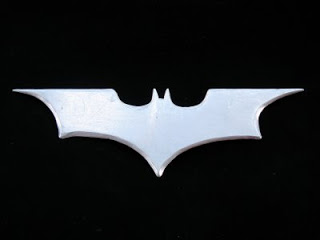
The Batrang

March 10th, 2009 No comments

I always wanted to have a batrang since I have always liked Batman a lot. So, I decided to build one now that they have become much simpler than before in the latest Batman films.

Materials

  • A chunk of steel

The tools I used

  • Various files
  • A Jigsaw
  • A hacksaw
  • A Dremel with a heavy duty cutting blade
  • A grinder
  • A sharpening stone
  • Various grit sandpaper
  • A steel wool sponge

I used the pattern below, extracted from a film poster (or something like that) and obtained by accentuating the contrast and cutting off colours until the shape was clean enough. I printed it so it measures around 3.5 cm by 12 cm.

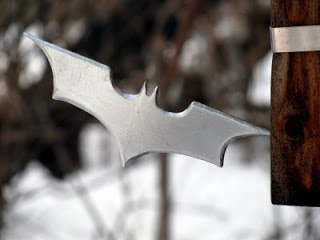
Then, I overlaid the printed and cut shape on the metal, traced it out with a marker and cut it roughly with the hack saw and the jigsaw (the jigsaw is not mine so I mainly used the hack saw). The next step was to grind and file the metal until it had the right shape. The lasts steps where to polish it and sharpen it so it could actually cut. I prefered making it sharp than polishing, as a result, it now serves as a multi-purpose knife or letter opener. I put a magnet on it so I can stick it to other metal surfaces such as a fridge.
As my readers may have guessed, I always prefer function instead of looks.

I may try to temper it to make it stronger and more durable.

Share and Enjoy:
  • Digg
  • StumbleUpon
  • Reddit
  • Twitter
  • Facebook
  • del.icio.us
  • Google Bookmarks
  • Print
Categories: Project Tags:

Solitudes

February 18th, 2009 No comments

In many drugstores and bookstores here in Montreal (AFAIK), we find the Solitudes CDs. These are CDs containing music mainly based on nature sounds (elevator music really). The interesting thing about this CDs is that they are displayed on a shelf with an interactive player that the customer can use to get a glimpse of the content of the CDs being offered. In other words, the customer touches on a CD icon, and the shelf starts to play (what seems to be) the contents of that CD.

Oddly enough, I found the guts of one of those shelves in the garbage and I will expose my findings here. Also, the system I found is in perfect working condition except for the power button which was broken.

How the system works

One might think that the shelf contains a CD library that plays the selected CD on command (that is what I thought anyways). But it is much simpler than that. The system consists of a computer CD drive connected to a small computer power supply and a sort of IDE controller (run by a microcontroller). The IDE controller is told what to do by the user interface, a sort of large keypad hooked up to a(nother) microcontroller. The sound is taken from the CD drive by using the standard audio port.

But, how come it can play all the CDs if there is a single drive? Simple, it doesn’t. It plays a special CD, with tracks corresponding to each one of the displayed CD. The tracks contain a mix featuring short samples of the CDs’ songs. One can have the illusion the entire CD is playing since nobody stays near those shelves for long enough.

Some Pictures

(BTW, I thing the pictures are much more enlightening than my explanation. They show the naked keypad, the back of the keypad with the microcontroller and dip switch position guide, the inside of the black box, and the IDE controller.)

Share and Enjoy:
  • Digg
  • StumbleUpon
  • Reddit
  • Twitter
  • Facebook
  • del.icio.us
  • Google Bookmarks
  • Print
Categories: Info Tags:

Big Buck Bunny Puzzle

January 27th, 2009 No comments

When I was a young child, I had a double-sided nine pieces wooden puzzle. It featured Pinocchio on one side, and a mermaid on the other. The pieces where all equally-sized rectangles. I really liked this puzzle and had it for a long time since not only it was a puzzle but the wooden blocks could easily become a wall, a pile of bricks, etc.

I wanted to reproduce this toy so my girlfriend and I built a new version of this puzzle for her two-years old cousin and gave it to her last Christmas. Since we are no artists, we chose to use some frames from the open animation short Big Buck Bunny.

Materials

  • Wood (the same pieces from the garbage I used in the bunk bedside table, in my case)
  • Wood glue
  • Two picture printouts (see the SVGs below)

Getting it done

First I divided the images in nine pieces of the appropriate dimensions so they fit nicely in my pieces of wood. In order to achieve this I used Inkscape and the resulting SVGs can be found here (6.7 MiB). Note that each piece on the SVGs is larger than the required dimensions so I can have a buffer in case the images are not precisely applied to the wood. I also drew cut lines in order to know where the section of the image to be cut is.

Since I wanted the end result to be durable and nice looking, I decided to order some laser prints for my SVGs instead of printing them myself. This was not too expensive (it cost around 3$ in total) and the print quality was quite good.

Once all the images are drawn and printed, the real job begins. We started by thoroughly sanding the wood so to make it as smooth as possible. Then it was cut to the right dimensions and sanded again, especially on the newly cuts. At the end, we got nine equally sized, very smooth wood rectangles.

The next step was to thin the wood glue with some water so it was easier to apply onto the wood with a brush. Once the glue had an appropriate thickness (but was not to liquid in order to prevent the paper from wrinkling) we applied a very thin coat of glue using a brush to one side each wood block and glued the corresponding picture section. Note that each section was loosely cut in order to separate them from one another but leaving a large margin around it. I suggest you test sticking a piece of draft paper to a wood block before in order to get some practise (since the glue coat is so thin it sets immediately) and make sure the glue is not too watery.

Once all the sections of one image were glued and dry, the exceeding paper margin was cut by laying the wood block flat on a smooth surface on the picture side and slicing it with an utility knife. Obtaining a clean cut was surprisingly difficult and depended heavily on the smoothness of the cutting surface (I recommend using a clean section of cardboard on a cutting board) and the sharpness of the blade (we had to change the blade several times during the process. If the blade was not sharp enough or there were bumps on the surface, the printed part of the paper pealed off very easily. In retrospective, maybe, applying a coat of varnish to the paper before cutting would have made the cutting job easier.

After one side of the puzzle was complete, the same process was applied to the other side with the other image. Then, we applied several coats of varnish to the blocks in order to make them more durable and easier to clean.

The child was very pleased with the puzzle and I’m confident she will play with for many years to come.

Share and Enjoy:
  • Digg
  • StumbleUpon
  • Reddit
  • Twitter
  • Facebook
  • del.icio.us
  • Google Bookmarks
  • Print
Categories: Project Tags:

Bunk Bedside Table

January 2nd, 2009 No comments

I built a bedside table for bunk beds from a pile of wood I found in the garbage and some flat nylon rope.

The Main Goal
I wanted to build a bedside table for the top bed on a bunk bed but I did not want it to become a head-banging hazard for those sleeping under it. So the table has to be rigid as seen from the top and mobile for those under it. My solution: a folding bedside table.

The Materials

  • Wood (six 6.8 cm x 60 cm pieces)
  • Flat nylon rope
  • Three cabinet-door stoppers
  • Three bolts with nuts
  • Staples
  • Varnish

Putting it Together

By stapling the nylon rope to one side of the wood pieces (as shown in the picture below) they become linked in a way that is rigid when applying force from the top, but can be folded easily if the force comes from the bottom. Note that the staples must be very close to the wood’s edge, otherwise, the structure will become a sort of ladder since the pieces can freely hang from one another. The original SVG is also available for download for those wanting to have more precise measurements.

In order to attach the bedside table to the specific bed it was meant for, I used some more nylon rope and another piece of wood.

The wood is used to hold table since it fits very tightly under it (as seen on the right) and the rope acts as an extra safety in case the table should fall (as shown below). Of course, I wanted to have the least destructive approach for fastening the table to the bed, otherwise, I would have only used screws. Also, I added a slight upwards curve to the table by using rubber door stopper in the middle joint so the objects stay on the table instead of going sliding down. Finally, I applied a think coat of varnish so the table is easier to clean and nicer to the touch.


An advantage of this table is that it can be folded away so it is not very intrusive and of course does not hurt anybody’s head. The downside, on the other hand, is that if it is folded while something is sitting on it, the object might at best get smashed or at worst go flying around the room.

Share and Enjoy:
  • Digg
  • StumbleUpon
  • Reddit
  • Twitter
  • Facebook
  • del.icio.us
  • Google Bookmarks
  • Print
Categories: Project Tags:

Breadboard Bench

December 31st, 2008 No comments

I found a nice breadboard in McGill’s garbage a while ago and decided to convert it into an electronics bench. My main goal was to have a powerful power supply with regulated outputs combined with a breadboard and some useful connectors so I can build circuit prototypes easily. Also, I needed a new bench power supply since mine was lost in the Lunar Excavator shipment.

Materials

  • A nice breadboard found in the garbage
  • A computer power supply
  • An ATX motherboard power connector
  • Two LEDs with resistors for current limiting
  • A switch
  • Some cables

Putting it Together

I wanted to build a modular system so I can replace the pieces easily, especially the power supply (since it comes from an old computer and may not work for very long).

I connected a switch and two LEDs (actually, my switch comes with an integrated light so I used only one LED) to the PS ON, 5V SB, and PWR OK pins so I can have an indicator of the power supply (PS) being plugged-in (D1) and another for the PS being turned ON (D2). The diagram below illustrates the connections.

I also connected the 12, 5, 3.3, 0, -5, and -12 V lines to the bottom-left banana connectors in order to have easy access to the power lines. Now, I can connect any ATX power supply to the box and it will work, which makes replacing a defective power supply very easy.

After making the electrical connections, the switch and LED(s) have to be mounted to the box by drilling appropriate holes.

This was a fairly easy build, with the only difficult part being to find the appropriate materials in the garbage.

I may add a USB hub or some USB connectors as well in order to have more ways of connecting things to the box.

Share and Enjoy:
  • Digg
  • StumbleUpon
  • Reddit
  • Twitter
  • Facebook
  • del.icio.us
  • Google Bookmarks
  • Print
Categories: Project, Tools Tags: